Sign In

  • Forgot your password?
  • Need a new account?

Register


Thermocouple thermometer | SIMTRUM Photonics Store

Thermocouple thermometer
The thermocouple thermometer is a high-precision temperature measurement device. Its core is based on the "Seebeck effect" principle of thermocouples - the measuring end is composed of two different materials of precious metal/alloy thermocouple wires.
 
When there is a temperature difference between the measuring end and the reference end, a stable thermoelectric potential will be generated at both ends. After being converted and amplified by the built-in high-precision signal processing module, Achieve precise quantitative display and data output of temperature.
 
The product features three core advantages: Firstly, it has wide range adaptability, capable of covering the entire temperature range measurement from -200 ℃ to 1300℃, meeting the demands of various scenarios from low-temperature cold chain to high-temperature metallurgy. Secondly, it features high precision, with a full-range measurement accuracy of ±0.15℃ and supports real-time dynamic temperature tracking. Thirdly, it has strong environmental tolerance. The core components are vibration-resistant and corrosion-resistant, suitable for harsh working conditions ranging from -20 ℃ to 80℃, enhancing the flexibility of on-site use.

Single-channel thermometer(IM-TCM1C)
Dual-channel thermometer(IM-TCM2C)


Feature

  • Single-channel and multi-channel thermocouple temperature measuring
  • Temperature measurement range :-200~1360°C
  • Temperature measurement accuracy :+0.3°C/+0.15%FS
  • Temperature resolution :0.01°C
  • Repeatability accuracy :±0.2°C
  • Sampling rate up to :60Hz
  • Single and multiple channels support USB driverless high-speed access


4-channel thermometer(IM-TCM4C)


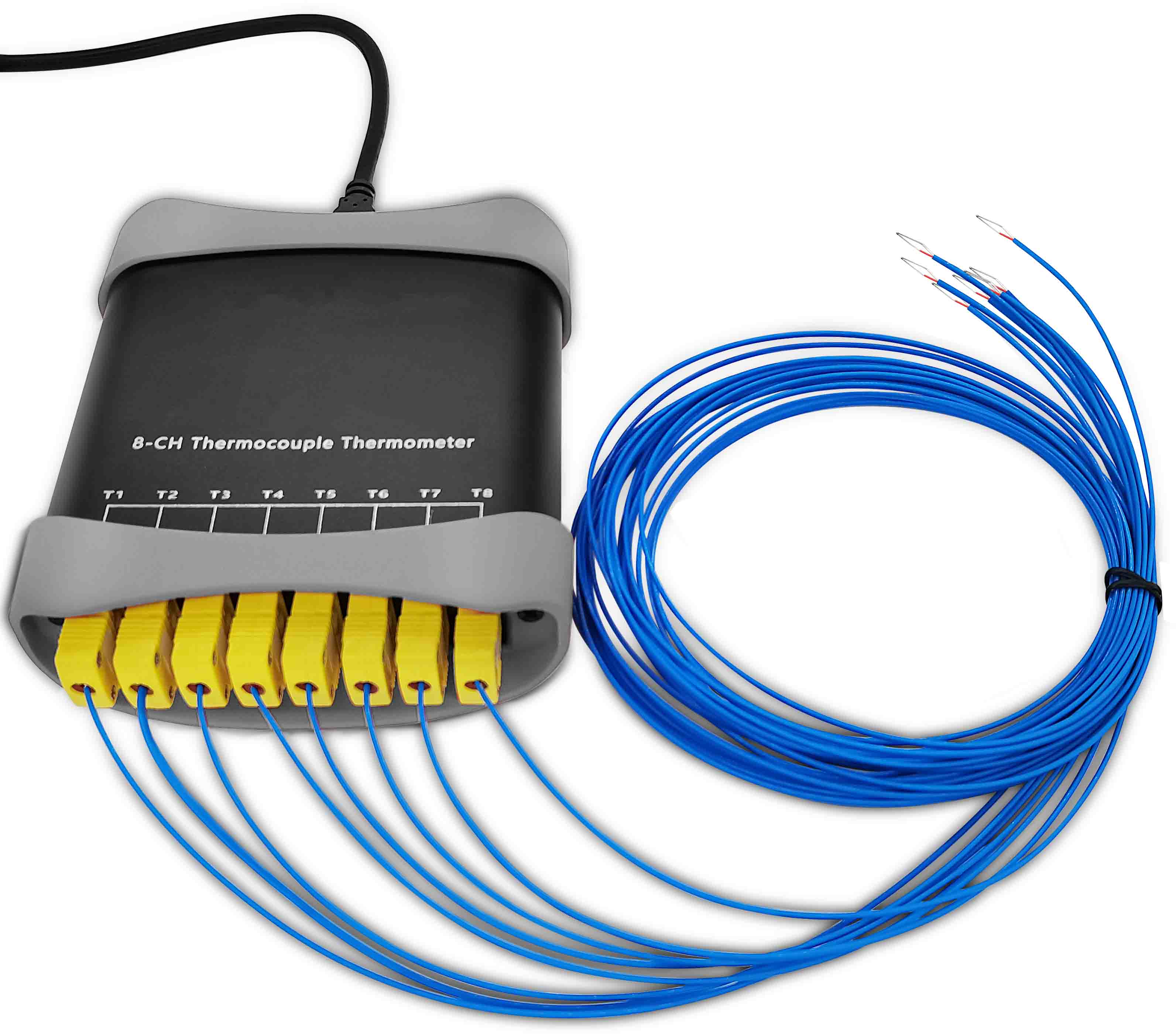
8-channel thermometer(IM-TCM8C)
 

Specification

Technical indicators

IM-TCM1C

IM-TCM2C

IM-TCM4C

IM-TCM8C

Supply voltage

USB built-in 5V (no external power supply required)

Power supply current

10mA

50mA

Temperature measurement range

-200~1360℃

Temperature measurement accuracy [1]

±0.4℃/±0.2% FS

±0.3℃/±0.15% FS

Temperature resolution

0.01℃(20位分辨率@25Hz)

Repeatability accuracy [2]

±0.25℃

Between channels:±0.25℃,Inside the channel:±0.2℃

Sampling rate

0.0Hz、0.2Hz、0.5Hz、1Hz、2Hz、5Hz、10Hz、15Hz、60Hz(多种采样频率可设置)

Overvoltage protection [3]

Isolation voltagebetween USB and thermocouple:

1500V

Isolation voltage between USB and thermocouple: 1500V

Channel overvoltage protection: ±45V (If the pressure difference between channels is greater than this value, there may be a risk of damaging the instrument.)

The number of thermocouples And type

Single-channel K-type

Dual-channel K-type

4-channel K-type

8-channel K-type

Thermocouple matching

Standard K-type thermocouple wire is provided. Wire lengths are available in 1.5m, 3m and 5m
(other wire lengths can be customized).

Standard size of thermocouple

Specification: K type (nickel-chromium - nickel-aluminum) 2x0.3mm, Wire diameter: 1.2×1.7mm(≈0.1mm

The temperature resistance of the probe tip is less than 1360℃, and the temperature resistance of the thermocouple coating is less than 280℃

Thermocouple interface

Direct welding type, no connector

Micro thermocouple plug/socket

Secondary development support

Provide SDK dynamic link library (USB)

The device also offers a serial port support version.
Please specify when placing an order (supports Modbus-RTU protocol).

Supporting software

Thermmonitor

Collection equipment

Windows7 and above devices

Communication method

The USB driver-free human-machine interaction interface device also offers a serial port version.
Please specify when placing an order (supports Modbus-RTU protocol).

Applicable scenarios

Measure the temperature of solids, liquids and gases

Operating temperature range

-20~80℃

Operating relative humidity

0-95% (No condensation)

Note

[1] The maximum deviation between the temperature measurement value of the thermocouple and the international standard thermocouple within the full range of 1500℃ was measured in a constant temperature environment of 25℃±5℃, with absolute accuracy measured within the range of 0-100℃.

[2] When a single channel or multiple channels are simultaneously used to measure the same constant-temperature object, the statistical error of the measurement results at a frequency of 1Hz is obtained in a constant-temperature environment of 25℃±5℃.

[3] Do not use thermocouples to directly measure the temperature of live objects. If it is necessary to measure the temperature of live objects, the probe must be insulated and protected. The voltage difference between multi-channel thermocouples should not exceed 45V; otherwise, the instrument may be damaged due to breakdown.


Serial communication protocol

This series of devices features two communication methods: one is USB communication, and the other is USB virtual serial port. Please make a clear note when placing an order.

When accessing the instrument in serial port form, the operation method is as follows: Insert the instrument into the computer, and a serial port device will be virtually created on the computer. The communication parameters are :57600,N,8,1. This mode supports the standard Modbus-RTU protocol. As long as the reading instruction is sent to the instrument in the form specified by the protocol, the instrument can feed back the corresponding temperature value. For the specific Modbus-RTU protocol address data table, please refer to our user manual.


Software

This series of thermocouple temperature measuring instruments can be configured, monitored and recorded through software.

The actual measurement pages of different models of thermocouple temperature measuring instruments are shown in the following figure:

Schematic diagram of temperature measurement with a single-channel thermometer
(IM-TCM1C)

Schematic diagram of temperature measurement with dual-channel thermometer
(IM-TCM2C)

Schematic diagram of temperature measurement with a four-channel thermometer
(IM-TCM4C)

Schematic diagram of temperature measurement with an eight-channel thermometer
(IM-TCM8C)


This software can achieve the following functions: automatically discover sensors, read and save the temperature measurement data of sensors, set the sampling rate, up to 60hz, set user calibration parameters, display temperature in real time and draw the measurement temperature curve, view the cumulative working time of sensors, view the number of times sensors are powered on and off, view the production date of sensors and other information.


Basic operation steps of the software

Step 1: Deploy the thermocouple temperature probe to the measurement site, and then connect the USB interface of the thermometer to the USB interface of the computer. For 4-channel and 8-channel thermometers, first insert the plug of the thermocouple into the instrument socket, and then connect the instrument to the computer with a USB cable.

Step 2: Run the software, and it will automatically locate the instrument. If you open the software first and then connect the instrument, you can click "Find Device" to locate the device. For the serial port version of the thermometer, click on "Settings" in the menu bar, then "Select Device Type", choose "Virtual Serial Port", and finally "Find Device".

Step 3: Set the sampling rate.

Step 4: Set whether to save the data. If you need to save data, you can fill in the data title and check the "Save Data" checkbox.

Step 5: Click the "Start" button on the menu bar to initiate data collection and parameter Settings.

Step 6: After the monitoring is completed, click the "Stop" button to stop the sampling.


Software calibration compensation calibration method

  • Set the sampling rate to be less than or equal to 2Hz and start the monitoring.
  • In the left attribute bar, modify the attribute "CalibCoeff1~8" corresponding to the temperature channel. Among the two values following it, the number in front of the value is K and the number after it is B. The correction formula is Y=K*+B (y is the actual value and x is the measured value).
  • After filling in the correct calibration parameters, click the "Write to Device" button to write the calibration parameters to the device, which will take effect immediately.


Data preservation

The software has a data saving function. Enter the file save name after the data title bar and left-click the "Save Data" checkbox with the mouse. Click the "Start" button to initiate temperature measurement and data storage. Save the data file in CSV format. After the monitoring is completed, you can access the CSV format data through the menu "File ">" Open Data Directory". This data format can be opened and analyzed using Excel software.


Data format of single-channel thermometer(IM-TCM1C)
Data format of dual-channel thermometer(IM-TCM2C)
 
 
Data format of 4-channel thermometer(IM-TCM4C)
Data format of 8-channel thermometer(IM-TCM8C)


Data column header description

The data storage format is shown in the above figure. "Time" represents the date and time," t(seconds) "represents the time interval s when a person starts recording,"T1" represents the temperature of the first channel, and so on. "Tenv" indicates the ambient temperature at the cold end; "Tavg" represents the average temperature of the 8 channels; "Tmax" represents the maximum temperature of the 8 channels; "Tmin" represents the minimum temperature of the 8 channels; "Trange" indicates the maximum temperature and the minimum temperature and the value of the minimum temperature. "Tsigma" represents the sigma values of 8 channels.


Product Dimensions

IM-TCM1C/2C dimension drawing
IM-TCM4C dimension drawing
IM-TCM8C dimension drawing

We are here for you!


Drop us an email at info@simtrum.com to get the Best Price today.   Want more technical information?
 Click Here for the professional Customized System/ Solutions.


Don't have time to search the products one by one? No worries.
you can download the full range of SIMTRUM Product Line Cards.
Click it now.


Want to stay closer to the Market Dynamics and Technological Developments? Just take 5 seconds to Sign In as a member of SIMTRUM,
we will bring you the most up-to-date news. 
(Sign in button on the top right of the screen).


Search Reset
Compare Model Drawings & Specs Availability Reference Price
(USD)
IM-TCM1C
USB output, for connection to a computer, comes with temperature measurement software, and features a single 1.5m temperature measurement cable
Contact us $22.23
IM-TCM2C
USB output, for connection to a computer, comes with temperature measurement software, and has two 1.5m temperature measurement wires
Contact us $33.35
IM-TCM4C
USB output, for connection to a computer, comes with temperature measurement software, and has four 1.5m temperature measurement wires
Contact us $80.80
IM-TCM8C
USB output, for connection to a computer, comes with temperature measurement software and eight 1.5m temperature measurement wires
Contact us $152.62

IM-TCM8C - Parameter

IM-TCM4C - Parameter

IM-TCM2C - Parameter

IM-TCM1C - Parameter

IM-TCM8C - Download

IM-TCM4C - Download

IM-TCM2C - Download

IM-TCM1C - Download

Accessories

Compare Model Drawings & Specs Availability Reference Price
(USD)